Client management
The real estate CRM built for solo agents
The short answer: the best CRM for a solo agent is the one that lives in your pocket, remembers everything a client actually told you — budget, area, bedrooms, financing — and costs nothing until your business outgrows it. Property Agenda is a free real estate CRM app for iPhone and iPad built for independent agents: no login, no ads, and it works offline.
Most independent agents run their client list across a spreadsheet, a notes app and memory. That holds up until the week it doesn't: a buyer calls and you can't remember whether their ceiling was 2.4 or 2.8 million; you promised options "early next week" and nothing reminded you; two clients with similar names blur into one wrong follow-up. Team CRMs solve this with dashboards built for a sales manager and a subscription priced for an office. A solo agent doesn't need more software — you need perfect recall of forty conversations, on your phone, in the ten seconds before you answer a call.
What a real client book stores
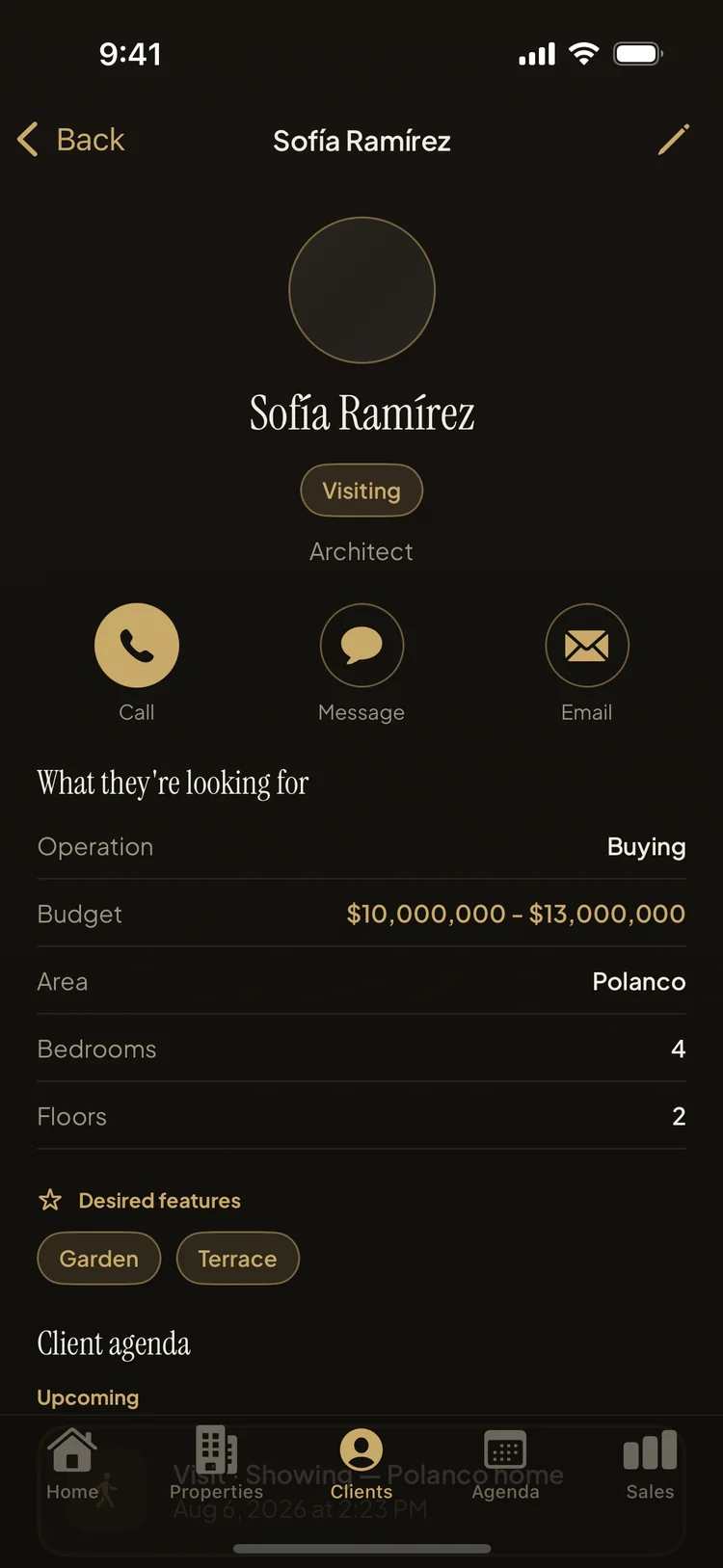
A phone contact stores who someone is. A client book stores what they're looking for:
- The person — name, phone, email, profession and a photo, so the profile you open is unmistakably them.
- The operation — buying or renting, paying cash or financing, and where that financing actually stands.
- The real budget — a minimum and a maximum, not one optimistic number.
- The brief — desired area, bedrooms, floors, and wish-list features like a garden, terrace or 24-hour security.
When all of that lives on one card, every conversation starts where the last one ended — and when a new listing comes in, you know within seconds who it's for.
Building your client book in Property Agenda, step by step
- Add the client in under a minute. Name and phone are enough to start; fill in budget, area, bedrooms and features as the conversation reveals them.
- Use the quick actions. Call, message or email straight from the profile — no switching apps and hunting through your contacts.
- Tap "View matching properties" before you pitch. Property Agenda ranks your inventory against the client's brief, so you lead with the listing that fits. Here's how the matching works.
- Put the follow-up on the client's own agenda. Each client has their own schedule of calls, showings and signings, so "I'll call you Tuesday" becomes a reminder, not a hope.
Following up at the right moment
Deals rarely go to the agent with the best inventory; they go to the one who called back first. Because every call, showing and signing in Property Agenda is linked to a client, the app can remind you at the moment it matters — a local notification for the Tuesday call, a nudge before tomorrow's showing, an overdue list for anything that slipped. And because the client's brief is structured data instead of prose buried in a notes app, saving one new property instantly tells you which clients it fits. That's a reason to call that isn't "just checking in."
The habit that makes it stick: update the card during the conversation, not after it. When a client mentions the bank approved their loan, change the financing status on the spot; when they say the terrace matters more than the third bedroom, adjust the wish list right there. Ten seconds per call keeps the book true — and a true book is the one you trust enough to keep opening.
Is the free plan really a free CRM?
Yes, with honest limits: 10 clients, 5 properties, 3 shared PDF exports and the top match per client. The limits only block creating more — nothing you've saved is ever locked away, and there's no trial countdown. When your book outgrows ten clients, Property Agenda Pro removes the caps with an auto-renewing subscription (monthly, 6-month or yearly) you can cancel anytime in your Apple Account settings.
Put your client book in your pocket
Property Agenda is free on the App Store. No account, no login, works offline.
Download Property Agenda